


Description
The CAN FD ETH RS232/RS485 Converter is a DIN-rail CAN FD to Ethernet/RS232/RS485 bidirectional converter, featuring high-speed, low-latency, stable performance, ease of use, and cost-effectiveness. It supports five data conversion modes: transparent conversion, transparent conversion with ID, standard protocol conversion, Modbus protocol conversion, and custom protocol conversion. Enables interconnection between CAN and Network port / serial port devices, compatible with CAN FD and CAN 2.0A/2.0B protocols.
It features industrial-grade design, supports -40°C ~ 85°C stable working, 9V ~ 36V wide power input, 5Kbps~1Mbps CAN FD arbitration domain baud rate, and 100Kbps~5Mbps CAN FD data domain baud rate.
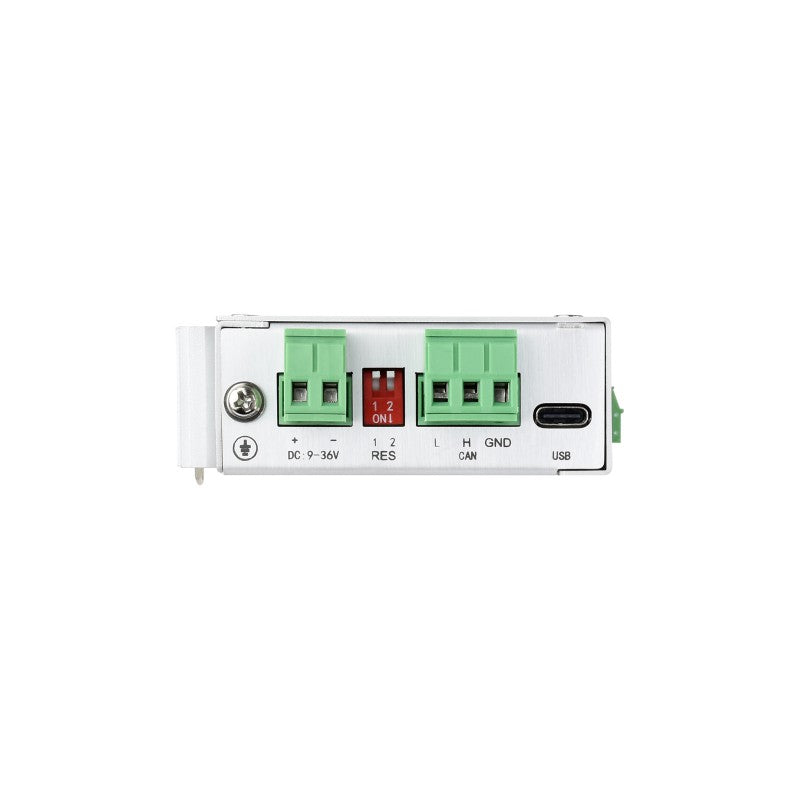
It supports parameter configuration via host computer, built-in 120Ω terminal resistors (switchable via DIP switches), supports DIN-rail mounting, easy to configure and install.


Specification
| Working voltage | DC 9V ~ 36V |
| Size | 110 × 27 × 85.6 (mm) |
| Installation | DIN-rail installation |
| Reload button | Long press to restore factory settings |
| Indicator light | POWER, WORK, COM, CAN |
| CAN port specification | 1-ch CAN port, supports CAN FD, compatible with CAN 2.0A/2.0B |
| CAN port baud rate | Arbitration domain baud rate: 5Kbps ~ 1Mbps Data domain baud rate: 100Kbps ~ 5Mbps |
| Terminal resistor | Built-in 2 × 120Ω terminal resistors Switching either DIP switch to ON connects one 120 Ω resistor in parallel |
| Network port specification | RJ45, 10/100Mbps, cross-connection adaptive |
| Serial port specification | Supports 1-ch RS485 or RS232 |
| Working temperature | -40℃ ~ 85℃ |
| Storage temperature | -40℃ ~ 105℃ |
| Working humidity | 5% ~ 95% RH (no condensation) |
| Storage humidity | 5% ~ 95% RH (no condensation) |
| Networking protocol | TCP server, TCP client, UDP server, UDP client (only network port) |
| Modbus gateway | Network port: CAN FD to Modbus TCP (Master/Slave) Serial port: CAN FD To Modbus RTU (Master/Slave) |
| Send message | Supports configuring up to 64 transmission messages |
| Receive message | Supports configuring up to 64 receiving messages |
| Protocol conversion | Transparent conversion, transparent conversion with ID, standard protocol conversion, Modbus protocol conversion, and custom protocol conversion |
| CAN ID | Supports standard frame and extended frame |
| Frame ID filtering | Supports only standard frames, only extended frames, and custom input frame ID (up to 32 groups) |
| Pack frame time | Supports customizing the number of frames and the time of frame packing (Network port) |
| Change direction | Supports bidirectional conversion, only serial / network port to CAN, and only CAN to serial / network port |
| Firmware upgrade | Supports the host computer for firmware upgrade |
| Parameter configuration | AT command and host computer software configuration |
| Other features | Supports heartbeat packets; register packets; normal, loopback, and only listen modes (Network port) |
| ESD protection | Air discharge: 8 KV, Contact discharge: 6 KV |
| Eft/Burst | Power circuit: 2KV; RS485/RS232 circuit: 1KV; Network port & CAN port circuit: 1KV |
| Surge immunity test | Power circuit: 1kV differential mode, 2kV common mode; CAN circuit: 2KV common mode; Serial port & Network port circuit: 2kV common mode |
Indicator Description
| Indicator | Color | Function description |
| POWER light | Red | Always on when powered on, turns off when powered off |
| STA light | Green | Flickering: Device operating normally, frequency 1s;
Strobe: Enters the CAN bus passive error state; Always on: CAN bus running abnormally |
| NET light | Green/Red | Green flickering: Indicates that the network port is receiving data
Red flickering: Indicates that data is being sent from the network port |
| CAN light | Red | Green flickering: Indicates that the CAN port is receiving data
Red flickering: Indicates that data is being sent from the CAN port |
Software